search api free mac software

dimanche 26 mai 2013

Jiggler 1.4 : No-Doz for your Mac

iggler is a little freeware app with one purpose: to keep your Mac awake. When you have some lengthy task for your computer to do, it's annoying to have to turn off your screensaver and turn off the sleep timer, only to have to turn it all back on again when you're done. (The "never sleep" corner will keep your screensaver from kicking in, but still won't prevent your machine from falling asleep.) What you really want is a little helper who will bump your mouse every once in a while to keep your machine alert. That's Jiggler.

Jiggler just wiggles your mouse every once in a while, keeping your machine awake and happy. When you want to stay awake, run it. When you don't want to, quit it. You can even run it while you're working, because you can set it not to wiggle your mouse unless your computer has been sitting idle for a while. Or you can configure it to:
  • jiggle only when your machine is busy working, to make sure it doesn't fall asleep in the middle of a long job
  • jiggle whenever an unburned CD or DVD is inserted, to make sure it doesn't fall asleep while burning
  • jiggle whenever iTunes is playing, so your music doesn't get interrupted
  • jiggle whenever a particular application is running, if there's an app your machine needs to stay awake for!
Jiggler is freeware (which means use it freely with no charge). If you like it, please check out our shareware products, and pay for the shareware you use. Thanks!


Download


Trisection 1.2 : A Tetris-style Mac game

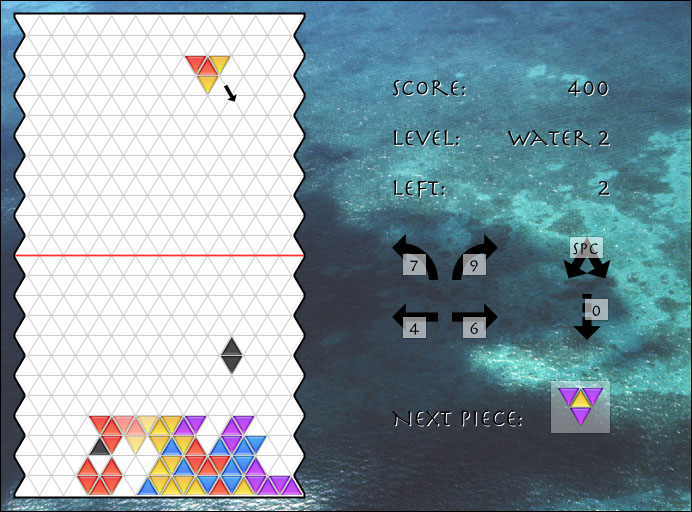
Trisection is a fast-action puzzle game for Mac OS X that was inspired by Tetris. We like it better, though; we think it's got more meat to it. Here's a screenshot, of the bottom part of Trisection's board:


Tetris is based on a boring old rectangular grid; Trisection uses a grid of equilateral triangles that will make you think "outside the box". Tetris is based on completion of horizontal lines, which is so intellectually trivial that it is mostly a reflex "twitch" game; Trisection is based on completion of colored areas, and it's much more intellectually challenging. Tetris is the same on every level, it just gets faster and faster; Trisection adds complexity through new colors and new triangle types to keep things interesting, not just physically challenging. Tetris will make your hands hurt; Trisection will make your brain hurt.

Here's an example of Trisection's game play:


The red and black piece is falling in the direction of the arrow, and it will land where the translucent "ghost" piece is (if the player does nothing). When that happens, a nice big red area will be formed, and here's what happens next:


The whole red area is disappearing, and the player is getting a bonus of 500 points. As long as you can keep completing colored areas like this, you'll stay alive. But there's a lot more to Trisection than meets the eye; you'll have to contend with bouncing, flipping, special black and white triangles, quadtriangles, new colors, the menace of the Terminator, and of course the ever-increasing pace of the game. Soon you'll be dreaming in triangles. If you liked Tetris, maybe you'll lose a month or two of your life to Trisection. If you loved Tetris, well... just try not to lose your job.

Trisection includes not one but two soundtracks, a whole raft of sampled sound effects, a beautiful photograph for every level's background, and a complete introduction to the game. Here's a reduced snapshot of the whole game window (click here for a full-size version):


Trisection is shareware (which means we rely on you to pay for it if you use it). It costs $15. Feel free to try it out for a little while before paying, but please don't forget that it is ultimately your responsibility to pay for it if you use it. For details on how we handle payments, see our main software page. Thanks!

Trisection's beautiful icon is by David Greenspan. The soundtrack music for Trisection is by Led Airegin. We'd like to thank David and the members of Led Airegin for their invaluable contributions. We would also especially like to thank Rob Vaterlaus, of Led Airegin, for coordinating the recordings and making it happen.

Download


Eyeballs 3.2 : Eyes for your desktop


Eyeballs is a fun Mac OS X application that gives you a set of eyeballs in your menu bar or on your desktop. The eyes watch the cursor move around as you work. They get sleepy depending on how busy you're keeping the cursor, and they blink periodically. They are extremely configurable, in terms of the colors they use, their eyelid and pupil style, how sleepy they are, and a bunch of other things (see the configuration panel snapshot below). If those configuration options aren't enough, custom skins are also supported! Here are a few examples:


This is a skin called "Aqua Blueberry" that shows a very simple skin design. The eyeballs are living on the desktop in this image.

This is a more unusual skin called "JetBlack", with stylized eyebrows and non-circular pupils.

This beautiful skin called "Anime Lime" is new in Eyeballs 3.2, and shows the ability to clip pupil images to the edges of the eyes, for a very realistic effect.

These skins, called "Eyegor" and "Cobweb", illustrate just how wacky skins can be!


There are more skins built into Eyeballs (including eyes in all five Aqua colors: Blueberry, Strawberry, Grape, Tangerine and Lime), and we expect there to be third-party skins made by Eyeballs users (maybe you!).

If you want to design your own eyeballs, but you're not enough of an artist to draw your own skin, you can make a "personality" by just choosing colors and settings:


This personality, called Kermit, is shown living in the menu bar; skins can be in the menu bar too!

This is Twitch, an overcaffeinated pair of eyeballs if there ever was one! Note the bloodshot corneas! Twitch almost never falls asleep, and his pupils (which are abnormally contracted) quiver slightly all the time.

These eyeballs are an alien personality named Zaphod. There are three eyeballs, of two different sizes, and all three blink independently of each other with an "irising" effect like that of a camera's aperture. The pupils are the "star" style for Zaphod.


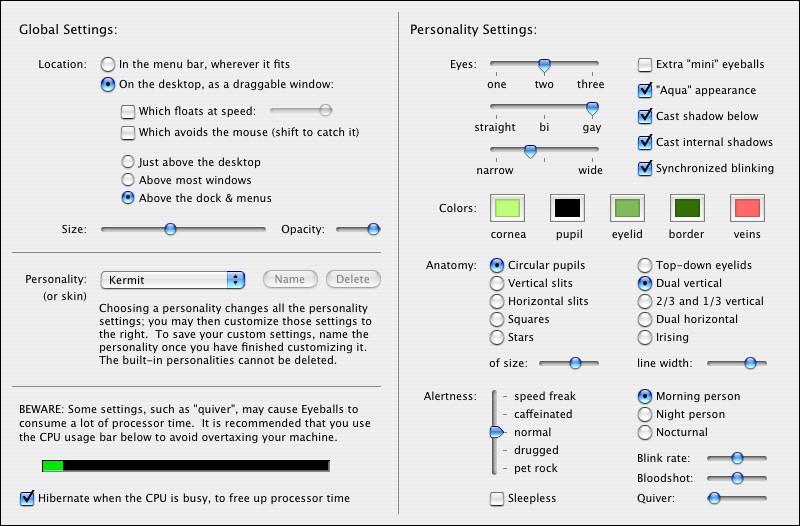
This should give you a taste of what Eyeballs is about. All of these settings are user-controllable, so you can make a set of eyeballs to suit your individual needs. Here's a reduced snapshot of the Stick Software-style overengineered preferences panel (click for the full-size snap):


If this seems complicated, there is an online manual to help you out (for a 76K PDF version of this manual that can be used offline, click here). But Eyeballs is really very simple and intuitive to use, and to be honest, the manual doesn't bother explaining most of the controls in the preferences panel, because they just don't need it, and because discovery and experimentation is part of the fun of Eyeballs.

Eyeballs is shareware (which means we rely on you to pay for it if you use it). It costs $10. Feel free to try it out for a little while before paying, but please don't forget that it is ultimately your responsibility to pay for it if you use it. For details on how we handle registrations, see our main registration page. Thanks!

The icon for Eyeballs was created by Alexander MacLean of widgetwidget.com. Thanks, Alexander!

The skins in Eyeballs were designed by Max Rudberg of MaxThemes and Kevin Husted of Swizcore Studio. Right now we don't have any third-party downloadable skins, but when we do, we'll link to them here!

Download

Bitdefender Virus Scanner


Bitdefender's Mac Virus Scanner seeks out threats to your Mac as well as your Windows machine, so you don't pass them on. (Twenty percent of Macs have Windows malware on them). You can use it to scan individual files by drag-and-drop.
• Available in the Mac App Store


Download

mercredi 22 mai 2013

NeoOffice

Another office suite developed exclusively for Mac. It is based on the same foundations that LibreOffice but has some differences, mostly ergonomic. A donation-modest-has become necessary to obtain the latest version.

Download


Bean

A marvel of word processor for Mac! Lightweight, fast, easy to use, packed with features that do not have TextEdit, or treatments to large integrated office suites text. Try it, if you do not know!

Download


HandbrakePM

HandbrakePM is a very handy tool to convert videos in batches. This is a simple GUI HandbrakeCLI (Handbrake command line). So it can sometimes advantageously replace the waiting queue HandBrake.

Download